How to Play Clipt
Everything you need to know — keep this handy!
What is a Clip?
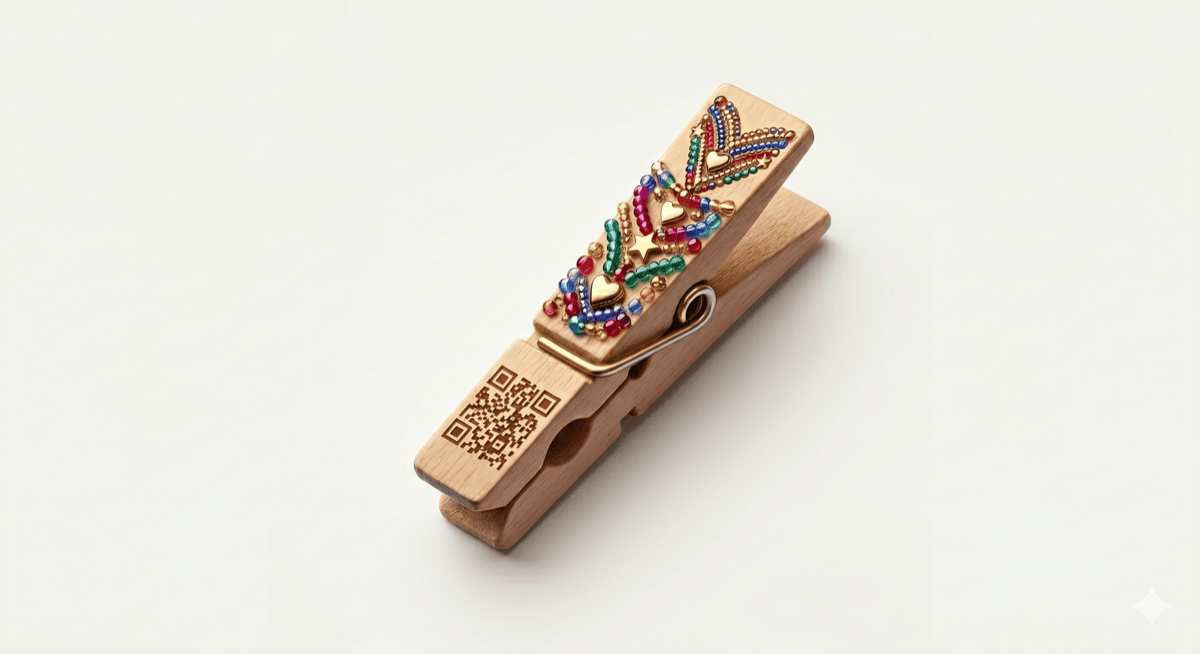
A clip is a real clothespin with a unique QR code printed on the nose. In the app, you design how your clip looks in the Clip Designer — colors, glitter, sayings, beads, stickers, and charms that make it unmistakably yours. (Want to decorate the real clothespin with paint or beads too? Go for it.) When someone scans the QR code, your decorated clip and your message appear — your little surprise. The clip then travels player to player, carrying your design with it, and you can track where it goes.
How a Clip Works
- You set it up. Open the app, scan your new clip, decorate it in the Clip Designer, then pick your message and name it.
- You clip someone. Sneakily attach it to a friend, a classmate, anyone — backpack, hoodie, sleeve, anywhere they'll find it.
- They discover it. When they spot the clip and scan the QR code, your surprise message pops up. "You've Been Clipt!"
- They decide. They can save the clip and keep it going, or let it travel on to somebody else.
If they save it, that clip is theirs — they can clip it forward to somebody new, and you can follow the whole journey from your pocket.
How Your Clip Travels
There's one kind of clip in Clipt, and it's built to keep moving. After someone scans it and sees your message, they can save it — they take it over, add their own message, and clip someone new. That person can do the same. And so on.
Every clip builds a chain — a record of every person it's traveled to, every message added, every place it's been. You can see the whole journey with View Chain History on the clip.
Here's the good part: every time your clip moves on, you earn traveling points. The further your clip travels, the more points come back to you.
Here's how the points work for your clip:
- Creating + clipping the first person: +100 points (your starting boost)
- Your very first clip ever: +50 more, and the Rule Setter badge
- Hops 1 through 9: +10 traveling points each
- Hops 10 through 19: +5 traveling points each
- Hops 20 and beyond: +2 traveling points each, forever
Your traveling points never stop coming. A clip that travels far is one of the best things that can happen in Clipt.
The Boomerang ✨
Here's something special: sometimes, after being passed around through lots of people, a clip lands back on someone already in the chain. That's called a Boomerang.
But a Boomerang has rules. Not every return counts.
Catch and Release
If a clip comes back to you too early — before it's traveled far enough — it's called a catch-and-release. You don't get to keep it. The clip continues its journey without you. Instead of a celebration you'll see "Whoa, short trip!" — the clip just moves on to find new people.
A True Boomerang
Once a clip has traveled through enough players, anyone in the chain who scans it becomes a Boomerang catcher. When that happens, the app throws a celebration. Confetti, glow, the works.
The clip lands in your pocket, and you'll see its whole chain history: every person who touched it, every message added, every place it traveled.
It isn't finished. A Boomerang is a homecoming, not an ending. Keep the clip as long as you like — or clip it forward and send it straight back out. Clips have come home more than once.
Boomerang Rewards
Catching a Boomerang doesn't pay on its own. Instead there are three big one-time rewards, and each one needs a different clip:
- Your 1st clip home: +250 points and the Boomerang badge
- A 2nd, different clip home: +500 points and the Double Boomerang badge
- A 3rd, different clip home: +1,000 points and the Boomerang Royale badge
- Every different clip after that: +250 points each time — they keep paying
Different clips is the part to remember. If the same beloved clip finds its way home to you five times, that's five celebrations — and one reward. To keep earning, a clip you haven't caught before has to come home.
Setting Up Your Clip
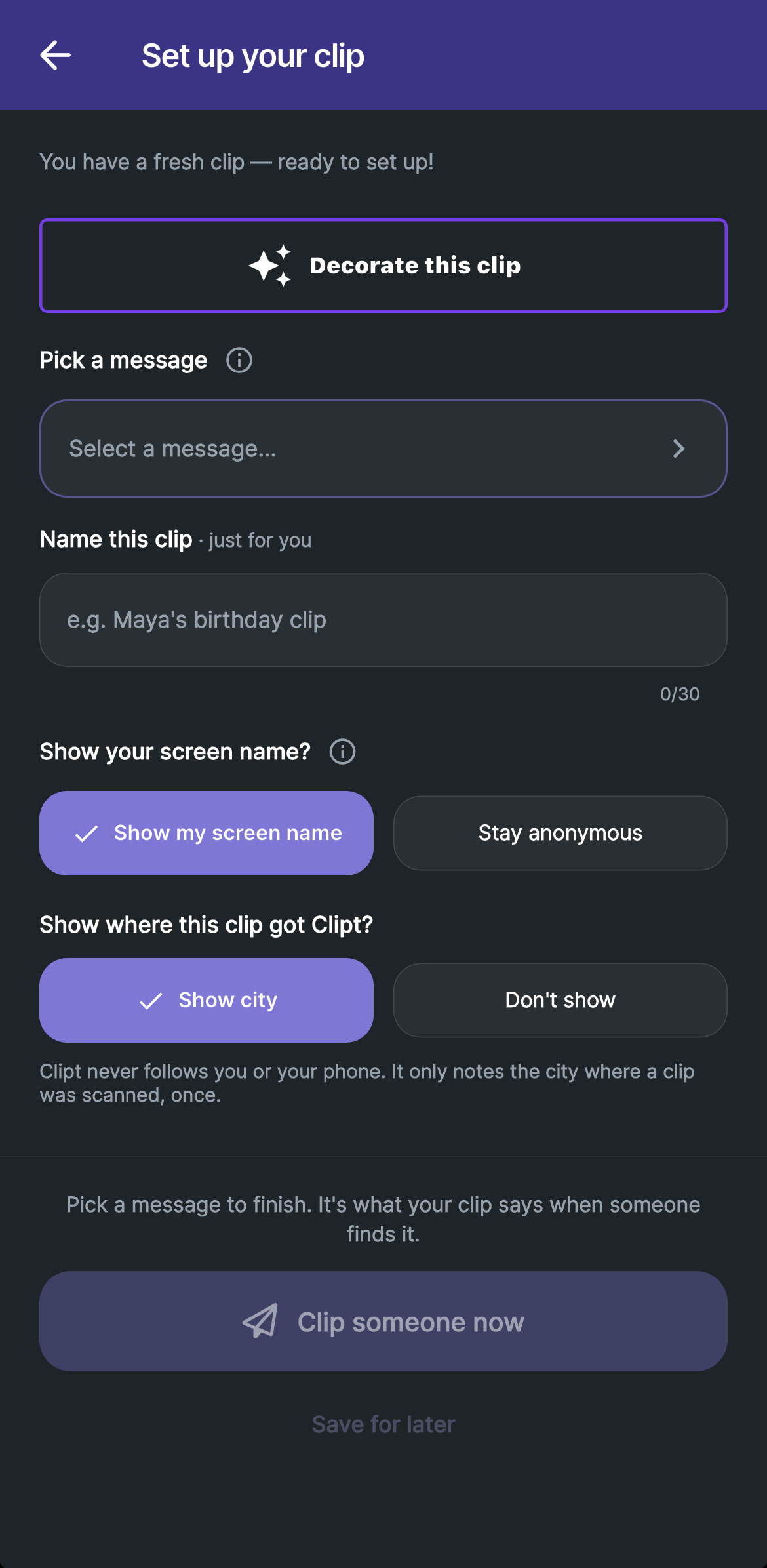
When you scan a new clip for the first time, you'll set a few things:
- Decorate Your Clip — Design your clip's look in the Clip Designer. This is your clip's identity, and it travels with the clip everywhere it goes.
- Message — Pick a short note the person sees when they scan, from a list of ready-made ones. Fun, kind, mysterious, or sweet. You need one to finish.
- Nickname — A name just for you to remember this clip by. Only you ever see it.
- Your name, or not — Pick Show my screen name so whoever finds it knows it came from you, or Stay anonymous to keep them guessing. You choose fresh on every clip.
- Your city, or not — Pick Show city or Don't show. See Your City on Clips below.
Then choose how to finish:
- Clip someone now sends the clip straight out into the world. Creating it and clipping someone earns you +100 right away.
- Save for later puts it in Clips in my pocket, ready for when you are. You earn +75 now, and the other +25 when you send it with Clip it Forward.
Decorate Your Clip
When you tap Decorate this clip during setup, you open the Clip Designer — your own little workshop for making a clip that's unmistakably yours.
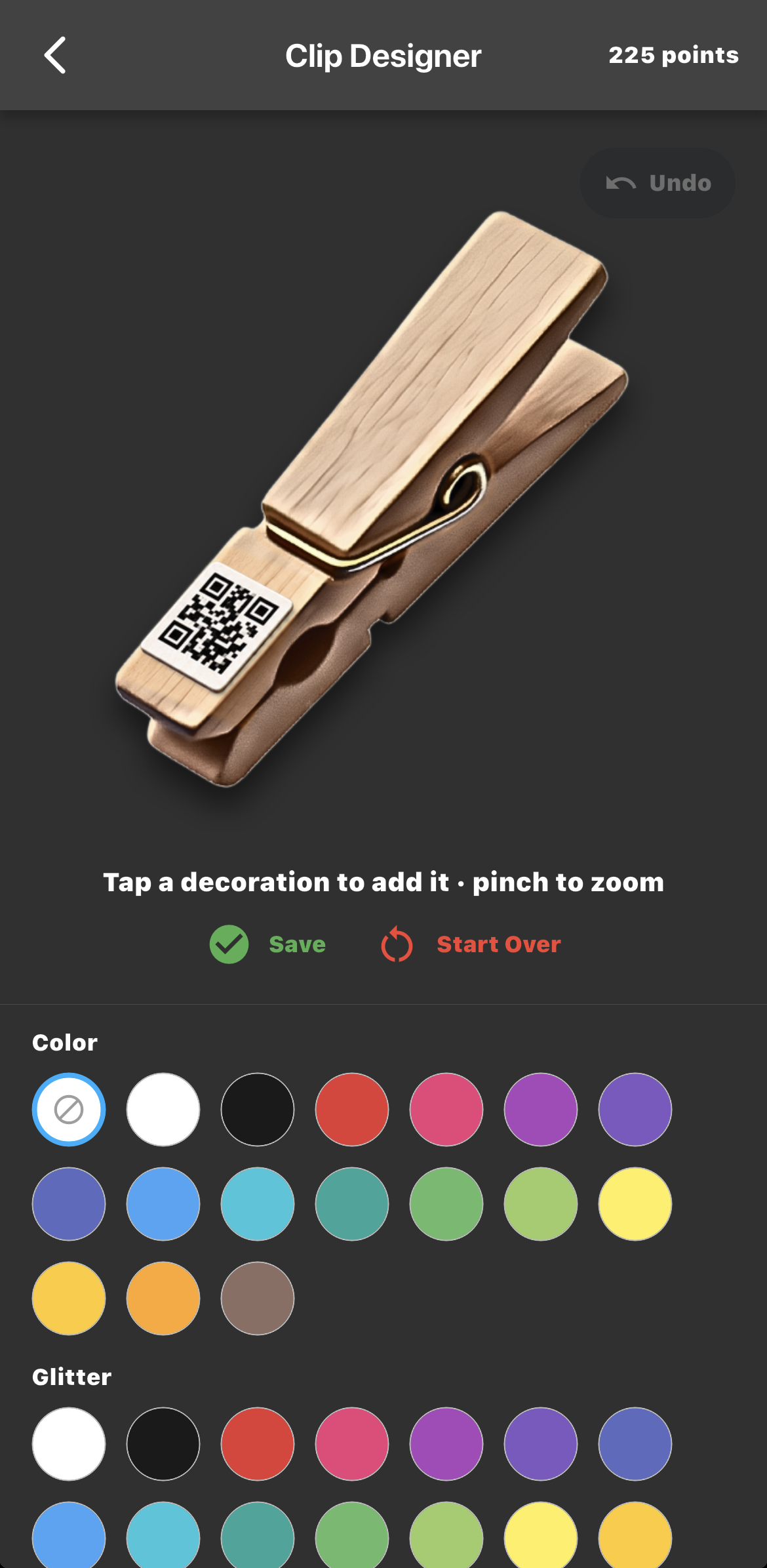
Start with a base, or don't:
- Color — pick one of 16 colors, or None for natural wood. A Shade slider makes it lighter or darker.
- Glitter — sparkle in one color or mix several. Tap a color to add it, tap it again to remove it, and slide to choose how much.
Then pile things on top: Ink sayings, Beads, Charms, and Stickers. Tap any tile to add it to your clip.
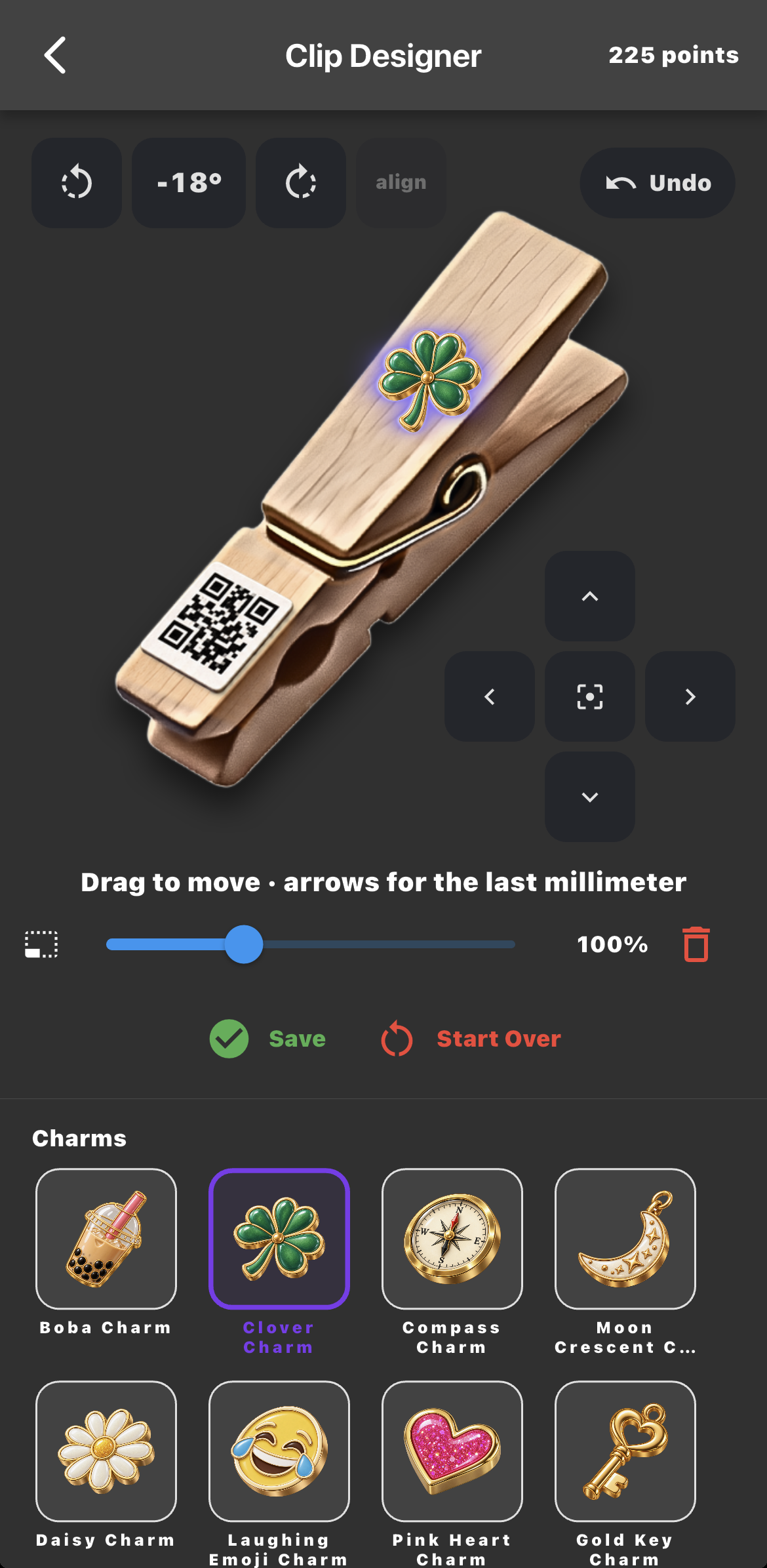
Tap a piece you've placed to edit it:
- Drag it where you want it — or use the arrows for the last millimeter.
- Turn it with the rotate buttons, or tap align to straighten it.
- Resize it with the slider, or delete it with the bin.
- Pinch to zoom in for the detailed bits; double-tap to zoom back out.
- Pieces stacked on top of each other? Tap the same spot again to switch between them.
- Made a mistake? Undo steps back, up to 20 times.
Don't love it? Start Over clears the paint, the glitter and everything on the clip — and it can't be undone.
Some decorations are free. Some unlock with points — once unlocked they're yours on every clip, for good, and points only come from playing, so there's nothing to buy. A few are rewards you earn by playing; points can't unlock those.
Whatever you make becomes your clip's look — and it travels with the clip everywhere it goes. Everyone who finds it sees the design you made. Changed your mind? Until the clip is first sent out, open it and tap Edit design. Once it's on its way, the design locks in, so it stays truly yours.
My Pocket
My Pocket is where you keep track of all your clips. It has two sections:
Clips in my pocket
Clips that are with you right now — ones you've set up and haven't sent yet, and ones you've saved from somebody else. They're waiting to be released into the world.
When you're ready to clip someone, tap the Clip it Forward button on the clip. This is your chance to:
- Change the message
- Show your screen name, if you were anonymous
- Or just send it out as-is
Once you tap Clip it Forward, your clip is released and ready to be discovered by whoever you clip it to.
Clips out in the world
Clips you've sent out that are still moving from person to person. Tap any one of them to see where it's been and who's added to it.
When You Get Clipt
If someone clips you, here's what happens:
- You spot a clip somewhere on your backpack, jacket, or anywhere.
- You scan the QR code on the nose of the clip — with the Scan button in the Clipt app, or with your iPhone's Camera, which opens Clipt right on the clip.
- The reveal screen plays — the decorated clip, the message, the whole surprise. Nothing is recorded yet.
- You decide. Save to My Clips takes it. Not now — let it keep traveling passes it on, and the sender is never told.
If you save it, you choose whether to show your screen name or stay anonymous in the chain, and whether to show your city, then tap Accept clip. The clip moves into Clips in my pocket so you can change the message before clipping someone new. The chain keeps going.
If the sender chose to stay anonymous, you'll see them as "Someone" — on the clip and everywhere on its journey.
Scanning with your Camera
- Signed in: Clipt opens straight on the clip.
- Signed out: you sign in first, then the clip opens.
- No Clipt app yet: you'll see a page about the clip instead. Hang on to it — once you have the app, scan it again.
No signal?
You can still accept a clip with no connection. Scan it, choose your name or stay anonymous, and tap Accept clip — you'll see a Waiting for signal card at the top of Clips in my pocket. When you're back online, it lands and we'll tell you who it came from. A few things to know:
- A brand-new clip can't be set up offline — scan it again when you're back online.
- An offline scan doesn't note your city.
- Scans more than three days old can't be added — scan the clip again instead.
- If the clip moved on to somebody else before your scan could land, we'll let you know.
Your City on Clips
Clips can show the cities they've passed through — but only if you say yes.
- Clipt never follows you or your phone. It only notes the city where a clip was scanned, once.
- Only the city — never a precise spot.
- It's off until you say yes. You choose on each clip (Show city or Don't show), and you can turn Show where clips get Clipt on or off in Settings at any time.
- The people a clip has passed through can see the cities on its journey. A stop with no city shows as "Somewhere on its journey."
Your Gallery
The Gallery is your own photo album of real clips — ones you've made, found, or love.
- Tap New card, then Take a photo or Choose from library.
- Link to its code by scanning the clip, so the card knows which clip it is. If you're on that clip's chain, View clip opens it.
- From a clip in your pocket, tap Add to Gallery — or View in Gallery to find its card.
- Tap the heart to add a card to your Favourites.
- To remove a card, press and hold it.
Points & Badges
You earn points by playing the game — creating clips, sending them out, and having yours travel far. Points can be used for discounts in the store (coming soon!).
You also earn badges for hitting milestones. There are nine badges right now, each celebrating a different way of playing:
Open Badges & Rewards in Settings anytime to see what you've earned and what's still out there.
Staying Safe
Clipt is meant to be fun, kind, and supportive. But if anything ever feels off — a message that's mean, something inappropriate, or a clip that just feels wrong — we want to know.
Reporting
Tap Report a Problem — in a clip's ⋮ menu, or in Settings. You can tell us about:
- Safety Concern — bullying, harassment, or misuse
- Physical Problem — broken pin, unreadable QR code, or the code fell off
- Lost or Destroyed — you can't find it, or it didn't survive
- Something Else — anything that doesn't fit the others
We review every report that comes in.
Blocking
If you don't want any more clips from a particular person, block them. There are two places to do it:
- On the clip — open its detail page, tap the ⋮ menu, and choose Block with their name.
- Settings → Who's Clipt You — a list of everyone who has ever clipt you. Use this to block someone days later, even if you've already deleted the clip.
Here's exactly what blocking does:
- They never find out. No notification, no message, nothing they can see. They just keep playing.
- Their clips stop reaching you. If you scan one they sent, it simply won't open for you.
- The clip itself is fine. It keeps traveling for everybody else — blocking is about the person, not the clothespin.
- Nothing you already have changes. Clips already in your pocket stay yours, points included.
- It's reversible. Unblock from the same list whenever you want, and clips flow again as if nothing happened.
Deleting Your Account
Go to Settings → Account → Delete Account. Before anything happens, the app shows you exactly what you'll lose:
- Your points are gone, and any store credit code you haven't used is cancelled.
- Clips you've passed on keep traveling — your stops on them show as "Someone" with no city.
- Your Gallery on this phone is deleted too.
It can't be undone, so take a moment first.
For Parents
Have questions about Clipt or how your kid is using it? Email us at support@clipt.games — we're a small team and we read every message. For details on what data we collect and how we protect it, see our Privacy Policy in Settings.
Questions? Tap Report a Problem in Settings, choose Something Else, and let us know what's confusing — we'll keep making this better.